

Consistent Characters in AI
Consistent Characters in AI: How to Keep the Same Face Across Any Scene, Style, or Outfit
Consistent characters are the difference between “cool AI images” and a story you can actually build. If you’re storyboarding, making a short film, designing a game, or creating branded content, your character needs to stay recognizable from scene to scene.
The challenge is that most image generators don’t preserve identity by default. Small changes in lighting, angle, outfit, or style can cause:
- Face drift (it starts to look like a different person)
- Expression mismatch (neutral becomes surprised, smile becomes a smirk)
- Continuity breaks (hair, age, proportions, or signature features quietly shift)
A consistent character workflow solves this by anchoring identity, so you can change everything around the character without losing who they are.
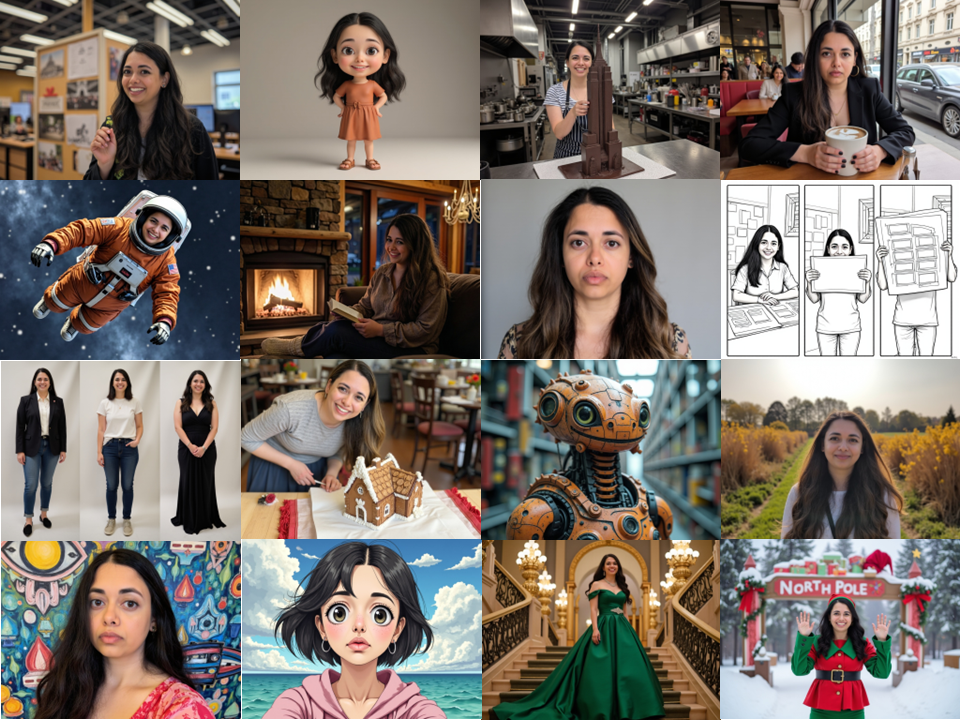
Example: one character, many variations
Below is a set of outputs from a single consistent character model, showing how identity can hold across different scenes, lighting, outfits, and styles.
The real goal: identity locks with creative freedom
Perfect consistency doesn’t mean identical pixels. It means the character is recognizable at a glance, and changes are intentional.
A strong setup lets you change:
- Environment (office → snowy street → ballroom)
- Wardrobe (casual → costume → formal)
- Medium (photo → illustration → storyboard line art → 3D)
…while keeping the same person.
A practical workflow for consistent characters
1) Start with a curated reference set
Your references are the foundation. You’re aiming for identity clarity, not aesthetic perfection.
What tends to work best:
- Clear face visibility
- A couple expressions (neutral + smile)
- Varied lighting (indoor + outdoor)
- Slightly different angles (front + 3/4)
If your project is public, curate accordingly. Don’t use anything you wouldn’t want to be public-facing.
2) Create an identity anchor you can reuse
Depending on the tool, this might be:
- A character model / identity embedding
- A LoRA-style identity anchor
- A “consistent character” profile you can apply across generations
What you’re aiming for is repeatability: the character stays recognizable even when you change everything else.
3) Lock the control variables before you chase variety
When you’re testing consistency, change fewer things. If you change everything at once, it’s hard to tell what caused drift.
Start by locking:
- Camera framing (close-up vs medium shot)
- Lens and perspective (portrait look vs wide distortion)
- Lighting direction (soft front light vs dramatic side light)
- Background complexity (keep it simple while testing)
Once identity holds under stable conditions, you can push harder on wardrobe, environment, and style.
For more on lens choice, framing, angles, and lighting, see Prompting Like a Filmmaker: Camera Language for AI.
4) Prompt for identity first, then style
A common mistake is leading with the scene and outfit. That’s how drift starts.
A reliable prompt order looks like this:
Identity → Camera → Expression → Wardrobe → Environment → Style
Example prompt template
Same character identity as the reference model. Keep facial structure consistent and recognizable.
Camera: 50mm portrait lens, medium shot, eye-level framing, natural perspective.
Expression: relaxed, closed-mouth smile, neutral eyes (no surprised expression).
Wardrobe: fitted black turtleneck, minimal silver necklace, natural makeup, hair down and cleanly styled.
Environment: modern office interior, soft daylight from a window, shallow depth of field, subtle background blur.
Style: photoreal, high detail, realistic skin texture, true-to-life color.
Constraints: no face changes, no age changes, no exaggerated proportions, no extra people, no duplicate faces.
5) Use constraints to prevent silent failures
Constraints sound simple, but they’re often the difference between “close enough” and “nailed it.”
Useful constraints include:
- “Do not change facial features.”
- “Same person.”
- “No age change.”
- “No exaggerated proportions unless specified.”
- “No extra people.”
For a more complete production system built around identity baselines, references, wardrobe libraries, and version locking, see How to Maintain Character Consistency Across 20+ Scenes.
Troubleshooting: the most common failures (and fixes)
Problem 1: The face changes slightly every time (face drift)
Why it happens: The prompt emphasizes the scene or style more than identity, so the generator “recasts” the person to match the new context.
Fixes:
- Put identity lines at the top of the prompt
- Reduce competing style descriptors
- Keep camera and lighting stable while testing
- Change one variable at a time until it’s stable
Problem 2: Expressions don’t match what you asked for
Why it happens: Expressions are subtle and often overridden by mood, lighting, or pose.
Fixes:
- Be specific: “closed-mouth smile” beats “happy”
- Add exclusions: “no surprised eyes, no open mouth, no exaggerated grin”
- Keep pose simple when expression precision matters
Problem 3: Consistency breaks when you switch styles (3D, anime, heavy illustration)
Why it happens: Stylization changes proportions and can overpower identity cues.
Fixes:
- Reduce “stacked” style words (fewer style adjectives)
- Keep facial proportions grounded unless you want exaggeration
- Expect to tune settings per medium (photo vs illustration vs 3D)
Character continuity also depends on the scene around the character. Lighting, palette, camera choices, and location details can all change how the same face is perceived. For a scene-level continuity system, see Why Your AI Scenes Don’t Match.
Where Radiate Studio fits
Radiate Studio is built to support character consistency as part of a real production workflow.
Instead of treating a character as a one-off prompt, Radiate treats your cast like reusable production assets: you define a character once, keep the identity anchor attached, and reuse that character across scenes and shots. When you’re iterating, the goal is to keep identity stable while you explore wardrobe, lighting, framing, and style.
Consistent characters matter even more once you’re working in sequences. If the face drifts every few shots, the story stops reading as one project.
For a broader start-to-finish workflow that connects characters to scenes, shots, storyboards, timing, and final generation, see How to Structure an AI Short Film From Start to Finish.
Takeaway: make characters reusable, not one-off
The biggest shift is moving from “generate a cool image” to “build a character system.” Once your character is consistent, you can:
- Storyboard scenes without recasting
- Generate costume tests quickly
- Keep a cohesive brand look
- Produce multi-scene narratives faster
That’s the foundation of scalable AI storytelling.
Start Creating with Radiate Studio
Radiate Studio helps keep characters, scenes, shots, versions, and feedback connected inside one production workflow.
Explore the platform and start building at RadiateStudio.ai.